
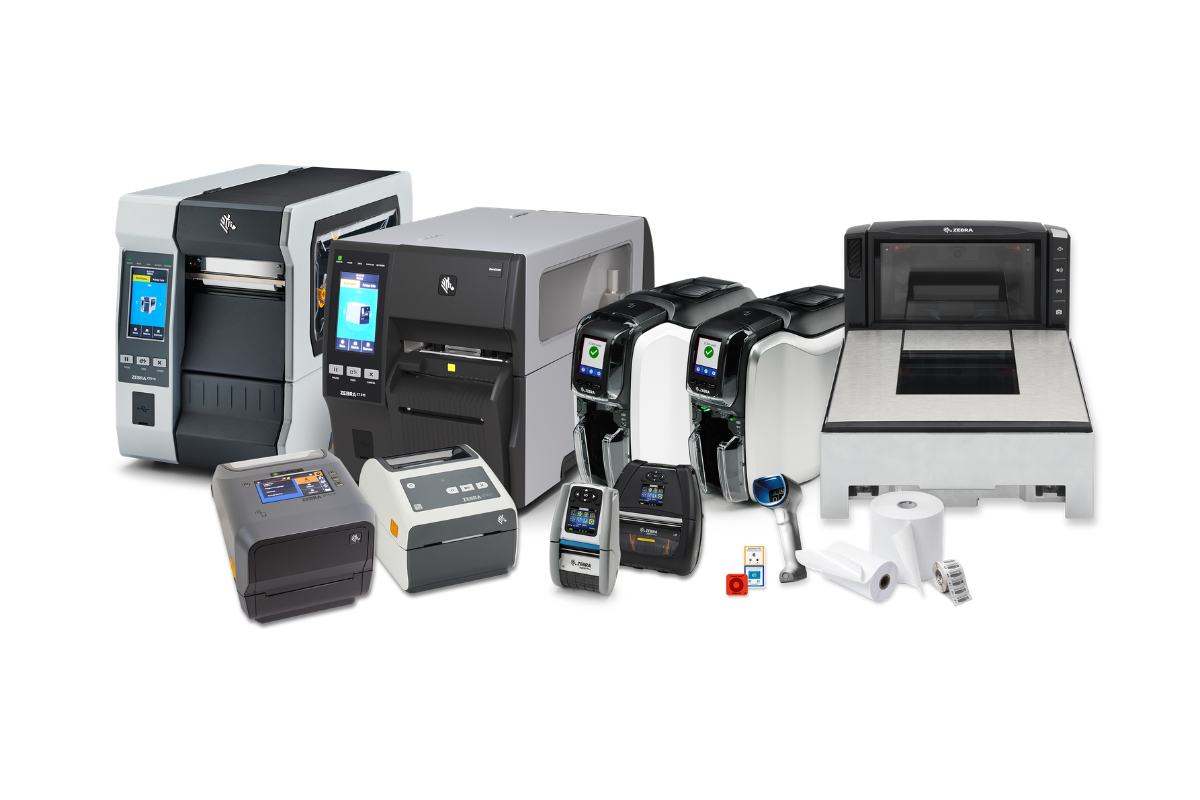
Whether you are running a busy warehouse, managing a retail stockroom, or processing orders from a small office, label printing is almost certainly part of your daily operations. The question that trips up many businesses, from sole traders to large logistics firms, is a deceptively simple one: should you invest in a desktop label printer or an industrial label printer?
The answer depends on far more than just budget. Print volume, environment, media type, duty cycle, and long term cost of ownership all play a role. In this guide, we break down the key differences between desktop and industrial label printers so that you can make a confident, informed decision for your business.
What is a desktop label printer?
A desktop label printer is a compact, self-contained unit designed to sit on a workbench, counter, or office desk. These printers are built for low to mid volume printing environments where space is at a premium and ease of use is a priority.
Desktop printers are typically lightweight, quiet, and straightforward to set up. They connect via USB, Ethernet, or wireless connections and are compatible with most standard label design software packages. Models such as the Zebra ZD220d, Zebra ZD421t, and Honeywell PC45T are good examples of what the modern desktop category looks like: compact in footprint, reliable in everyday use, and accessible in price.
Typical use cases for desktop label printers:
- Small to medium retail operations printing price, product, or shelf labels
- Office environments printing address, postage, or filing labels
- Healthcare settings producing patient wristbands, specimen labels, and pharmacy tags
- Light warehouse operations handling modest daily label volumes
- E-commerce businesses printing shipping labels for outgoing orders
Desktop printers generally support print speeds of around 4 to 6 inches per second, with print resolutions commonly ranging from 203 to 300 DPI. They are available in both direct thermal and thermal transfer configurations, making them versatile enough for a wide range of label materials and applications.

What is an industrial label printer?
An industrial label printer is a heavy duty unit engineered for demanding, high volume production environments. These printers are built to run for extended periods without overheating or mechanical fatigue, and they are housed in rugged enclosures that can withstand the knocks, dust, moisture, and temperature fluctuations found on factory floors and in large distribution centres.
Industrial printers are substantially larger and heavier than their desktop counterparts, but they compensate for that with significantly higher print speeds, wider media handling capabilities, and far greater duty cycles. Models such as the Zebra ZT411, Zebra ZT231, Zebra ZT620, and the Citizen CL-S703III represent the kind of performance and resilience that industrial operations demand.
Typical use cases for industrial label printers:
- High volume warehousing and logistics operations
- Manufacturing and production line labelling
- Distribution centres processing large quantities of shipments daily
- Compliance and regulatory labelling in sectors such as food and beverage, pharmaceuticals, and aerospace
- Any environment where the printer runs continuously across multiple shifts
Industrial printers typically deliver print speeds of 8 to 14 inches per second, with some models reaching beyond that. They also support a broader range of media widths, heavier core sizes, and more demanding label materials including polyester, polyolefin, and chemical resistant substrates.
Key Differences at a Glance
1. Print Volume and Duty Cycle
This is arguably the most important factor when choosing between the two categories. A duty cycle refers to how much printing a machine can reliably handle within a given period, usually expressed as labels per day or per month.
Desktop printers are designed for low to moderate volumes, typically in the range of a few hundred to a few thousand labels per day. Pushing a desktop printer beyond its rated duty cycle will lead to premature wear on the printhead, platen roller, and other components, resulting in poor print quality and costly repairs or replacements.
Industrial printers are engineered with components that can sustain continuous operation across an entire production shift, and in some cases around the clock. Their printheads, motors, and media transport mechanisms are built to a significantly higher specification, meaning they can process tens of thousands of labels per day without degrading in performance.
2. Build Quality and Durability
Desktop printers are generally constructed with a mix of plastic and metal components. They are perfectly adequate for the environments they are intended for, but they are not designed to withstand rough handling, excessive dust, oil, or prolonged exposure to extreme temperatures.
Industrial printers are built with heavy gauge metal chassis and reinforced internal components. Many models are IP-rated or MIL-STD certified, meaning they have been tested against specific standards for dust and moisture ingress, shock, and vibration. If your printer lives in a busy warehouse, a cold store, or near manufacturing machinery, an industrial unit will cope far better over the long term.
3. Print Speed
For businesses where throughput matters, print speed can make a meaningful operational difference. Desktop printers typically top out at around 6 inches per second. Industrial printers routinely offer 8, 10, 12, or even 14 inches per second, enabling operators to keep up with fast moving production or despatch lines without creating bottlenecks.
4. Media Handling Flexibility
Desktop printers work well with standard label rolls on small cores and within a defined range of media widths, typically up to 4 inches. Industrial printers can accommodate much larger roll sizes, heavier media stocks, wider label formats (with some models printing up to 6 inches wide), and specialist substrates that desktop units simply cannot handle.
This matters significantly in sectors such as manufacturing or logistics, where oversized labels, chemical resistant materials, or linerless media are routinely required.
5. Connectivity and Integration
Both desktop and industrial printers offer USB and Ethernet connectivity as standard, with many models across both categories also supporting Bluetooth and Wi-Fi. However, industrial printers tend to offer more advanced integration options, including GPIO ports for connecting to production line sensors and PLCs, serial interfaces, and applicator outputs for automated label application systems.
If your labelling needs to integrate directly into a manufacturing execution system (MES) or warehouse management system (WMS), an industrial printer will offer greater flexibility and reliability in that context.
6. Total Cost of Ownership
Desktop printers carry a lower upfront cost, which can make them attractive for smaller operations or tighter budgets. However, if a desktop printer is being used at a volume beyond its intended capacity, the ongoing costs of printhead replacements, repair callouts, consumable waste from poor quality output, and eventual unit replacement can quickly erode any initial saving.
Industrial printers represent a higher initial investment, but their components are rated for far greater longevity, their printhead life is measured in kilometres of print rather than in months, and their overall reliability in demanding environments reduces unplanned downtime considerably. For businesses operating at scale, the cost per label over the lifetime of an industrial printer is frequently lower than that of a desktop unit working above its limits.

How to Decide Which is Right for You?
A useful way to approach the decision is to honestly assess your operation against the following questions.
How many labels do you print per day? If the answer is in the hundreds, a desktop printer is almost certainly adequate. If you are printing thousands, or your volume is growing rapidly, you should be looking at industrial options.
Where will the printer be located? A clean, climate controlled office or retail stockroom suits a desktop printer well. A warehouse floor, factory environment, or anywhere with dust, vibration, or temperature extremes calls for industrial build quality.
What media types do you need to print on? Standard paper labels on small cores are well within the capability of any desktop printer. Specialist materials, wide format labels, or very large roll sizes point towards an industrial solution.
How critical is uptime to your operation? If a printer going offline for even an hour causes significant disruption to your workflow, you need a unit built for continuous operation and you need the serviceability that industrial printers provide.
Are you planning to integrate with automated systems? If your labelling is part of a larger automated production or fulfilment process, industrial printers offer the interface options and reliability that integration demands.
A Note on Thermal Transfer vs Direct Thermal
Whichever category you choose, you will also face a choice between direct thermal and thermal transfer printing. This applies to both desktop and industrial ranges.
Direct thermal printing uses heat to activate a special coating on the label itself. There is no ribbon involved, which reduces consumable costs and simplifies media changes. However, direct thermal labels are sensitive to heat, light, and friction, making them less suited to long term outdoor use or harsh storage conditions. They are widely used for short life applications such as shipping labels and receipts.
Thermal transfer printing uses a ribbon to transfer ink onto the label surface, producing a result that is far more resistant to heat, moisture, chemicals, and UV exposure. The output is significantly more durable, making thermal transfer the preferred choice for asset labels, compliance labels, and anything that must remain legible for months or years.
Both methods are available across Kestronics' desktop and industrial ranges, so whichever printer category you choose, you can select the right print technology to match your label lifespan requirements.
Summary
Choosing between a desktop and an industrial label printer is ultimately a question of matching the right tool to your actual workload, environment, and growth plans. Desktop printers are an excellent choice for low to mid volume requirements in controlled environments where cost efficiency and compact footprint are priorities. Industrial printers are the correct investment for high volume, continuous, or harsh environment applications where reliability, speed, and durability are non-negotiable.
Getting this decision right from the outset saves money, reduces downtime, and ensures that your labelling operation can scale alongside your business. If you are unsure which category best fits your needs, the Kestronics team is always happy to help you work through the options.